Review
Tynker has carved out a recognizable position in the educational app space, especially for families and schools looking to introduce co...
Tynker App Review: A Structured and Scalable Way to Learn Coding Skills
Tynker has carved out a recognizable position in the educational app space, especially for families and schools looking to introduce coding concepts in a structured yet approachable way. From the perspective of a tech reviewer who has tested dozens of learning platforms over the years, Tynker stands out not because it tries to appeal to everyone, but because it knows exactly who it is built for. It focuses on guided learning, visual logic, and gradual progression, which makes it particularly effective for younger users while still offering enough depth to remain relevant as skills grow.
Unlike many apps that promise quick results, Tynker emphasizes consistency and practice. It feels more like a curriculum than a casual app, and that distinction becomes clear within the first few sessions. While adults may not find it entertaining in the traditional sense, its design choices make sense when viewed through the lens of education technology rather than pure entertainment.
Purpose-Driven Design
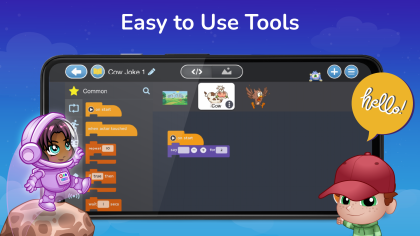
The core idea behind Tynker is to make programming accessible without overwhelming beginners. It achieves this through block-based coding, visual feedback, and structured challenges. The interface avoids clutter and keeps attention focused on the task at hand, which is critical for younger learners.
Navigation is intuitive, even for users who have never interacted with a coding app before. Menus are clearly labeled, progress is tracked visually, and lessons are broken into manageable segments. From a usability standpoint, this is one of the app’s strongest features.
Learning Experience and Features
Tynker offers a wide range of learning paths, from simple logic puzzles to more advanced programming concepts. Early lessons rely heavily on drag-and-drop blocks, while later stages introduce text-based coding elements. This gradual transition helps bridge the gap between visual coding and real-world programming languages.
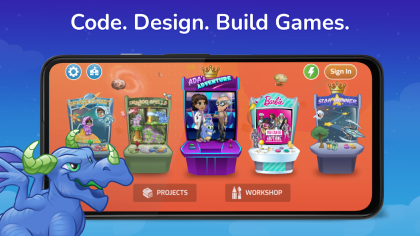
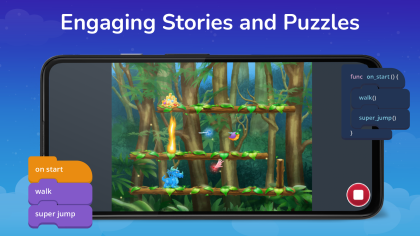
The app includes interactive stories, game creation tools, and logic challenges that encourage experimentation. Users can play with variables, loops, and conditionals without needing to understand complex syntax. These features are thoughtfully integrated rather than feeling tacked on.
Progression and Skill Building
One of the most impressive aspects of Tynker is how it manages progression. Lessons build logically on one another, and repetition is used strategically to reinforce concepts. Instead of rushing users forward, the app ensures that foundational skills are solid before introducing new ideas.
For parents and educators, progress tracking is a valuable addition. You can see which concepts have been mastered and where extra practice may be needed. This makes Tynker suitable not only for home use but also for classroom environments.
Visuals, Audio, and Engagement
Visually, Tynker is colorful without being distracting. Characters and animations add personality, but they never interfere with the learning process. The design language feels modern and friendly, which helps maintain engagement over longer sessions.
Audio cues and subtle sound effects provide feedback without becoming repetitive. This balance is important in an educational app, where overstimulation can be counterproductive. Tynker manages to stay engaging while remaining focused on learning outcomes.
Platforms and Accessibility
Tynker is available across multiple platforms, making it accessible to a wide audience. Mobile users can download and install the app on Android and iOS devices, while browser-based access supports desktop environments. This flexibility is especially useful for schools that rely on shared devices.
While there is no native Windows or Mac desktop app, the web version fills that gap effectively. Chromebook support is also solid, which is a significant advantage in educational settings. Users looking for an apk version on Android should be cautious and rely only on trusted sources.
Free vs Paid Experience
Tynker offers a free tier that allows users to explore basic lessons and features. This is enough to understand how the app works and whether it suits your needs. However, the more advanced content is locked behind a subscription.
From a reviewer’s standpoint, the pricing is reasonable given the depth of the curriculum, but it may not appeal to casual users. Those looking for a completely free coding app may find the limitations frustrating. Still, the paid version delivers substantial value for committed learners.
Use in Schools and Restricted Networks
Tynker is designed with education in mind, and that includes compatibility with school networks. In many cases, the browser-based version can be accessed unblocked, even in restricted environments. This makes it easier for teachers to integrate it into lesson plans.
However, some regions or institutions may impose additional restrictions. In such cases, access depends on local network policies rather than the app itself. Offline functionality is limited, so consistent internet access is recommended.
Overall Impression
Tynker succeeds by staying focused on its mission: teaching coding fundamentals in a clear and approachable way. It does not try to be a one-size-fits-all solution, and that restraint works in its favor. For children, students, and educators, it provides a reliable and thoughtfully designed learning environment.
As an experienced app user and tech reviewer, I see Tynker as a long-term educational investment rather than a quick learning tool. If you are willing to commit time and, potentially, a subscription, the app delivers meaningful results.
How to download and install Tynker
Availability & Cost: Tynker is available through official app stores and its website, offering a free version with optional paid subscriptions for full access.
Supported Platforms: The app supports Android and iOS devices, works through browsers on Windows, Mac, and Chromebook systems, and is not available as a native desktop app.
How to Install: Mobile users can download and install Tynker from the Google Play Store or Apple App Store, while desktop users can access it directly through the official website.
System Requirements: Android devices typically require a modern OS version and stable internet access, while iOS devices need a recent system update to run smoothly.
APK Availability: An apk version may exist online, but users should only download it from reputable sources to avoid security risks.
Unblocked Access: In many school or work environments, the web version can be used unblocked, though access depends on local network restrictions.
Pros:
- User-friendly interface for beginners;
- Supports multiple learning paths;
- Available across major platforms;
- Strong progress tracking tools;
- Engaging visuals without distraction;
- Well-structured coding curriculum;
Cons:
- Limited appeal for adult learners;
- No standalone desktop application;
- Advanced content requires subscription;








Recent Reviews

Fortnite
Minecraft

Grand Theft Auto V

Toca Boca World